
DNS Records
Learn which DNS entries are relevant for web hosting.
1. General Information
Record
Description
Host
Host name, e.g.,
- @ = Root domain
- * = All subdomains not explicitly configured
in the DNS (Wildcard)
Type
Record type, e.g.,
- A = A-Record (Address Record)
- AAAA-Record (IPv6 Address Record)
- MX = Mail Exchange Record
- TXT = Text Record
- CNAME = Canonical Name Record
MX
For the MX type, a priority
is set that determines the
order in which mail servers
are contacted for the delivery
of emails.
Destination
Destination of the record.
valid
Validity of a record.
A-Record (Address Record)
Points a domain to an IPv4 address.
AAAA-Record (IPv6 Address Record)
Points a domain to an IPv6 address.
MX = Mail Exchange Record
Indicates the mail server for a domain.
TXT = Text Record
Stores textual information (often for verification or security purposes).
CNAME = Canonical Name Record
Clones the DNS of another domain.
2. Managing DNS Records
You can find the target addresses for the allocation in the Customer Control Panel (CCP) under the Overview tab in your web hosting product.
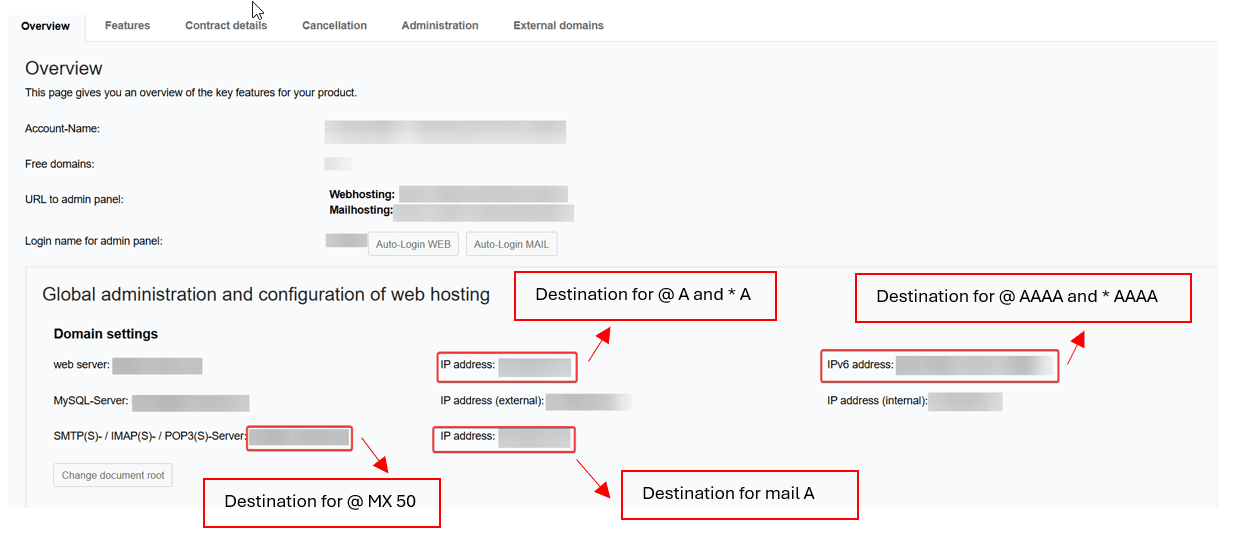
- To customize the DNS records, go to the menu item Domains in the Customer Control Panel (CCP).
- Then click on the Magnifying Glass Icon next to the desired domain and switch to the DNS tab.
Example DNS records could be as follows:
Web Server
- Root domain points to the web hosting server IPv4:
- Host: @
- Type: A
- Destination: 1.2.3.4
- Root domain points to the web hosting server IPv6:
- Host: @
- Type: AAAA
- Destination: 2001:DB8::1
- All subdomains not defined separately point to the web hosting server IPv4:
- Host: *
- Type: A
- Destination: 1.2.3.4
- All subdomains not defined separately point to the web hosting server IPv6:
- Host: *
- Type: AAAA
- Destination: 2001:DB8::1
Mail Server
- Indicates the target server for the MX record mail.domain.tld:
- Host: mail
- Type: A
- Destination: 1.2.3.4
- Indicates how the mail server can be reached:
- Host: @
- Type: MX (10)
- Destination: mail.mydomain.de (mydomain.de is to be replaced)
- Indicates how the mail server can be reached:
- Host: @
- Type: MX (50)
- Destination: mx1.netcup.net (mx1.netcup.net is to be replaced with the mail server address)
- SPF (allows emails to be sent from the server specified in the A record and in the MX record, as well as from our mail relay. This makes it possible for third parties to recognize whether the email actually comes from the domain owner.):
- Host: @
- Type: TXT
- Destination: v=spf1 mx a include:_spf.webhosting.systems ~all
- DKIM (adds a digital signature to ensure that emails have not been altered and come from the rightful sender.):
- Host: key1._domainkey
- Type: CNAME
- Destination: key1._domainkey.webhosting.systems
- DKIM (adds a digital signature to ensure that emails have not been altered and come from the rightful sender.):
- Host: key2._domainkey
- Type: CNAME
- Destination: key2._domainkey.webhosting.systems
Both DKIM records (key1 and key2) are required for complete security.
Note that the records will only work as intended if the default DNS settings are used and emails are sent exclusively via the product's mail server. Emails sent via alternative methods such as the web server (e.g. phpmail or sendmail) or an external mail server are excluded and not valid.